ITDownload free

Club nights, festivals

Multicam sync and automatic editing for club nights and festivals

The cameras of the night line up on their own, with no timecode and no slate. The edit comes out already cut on the drops and the energy changes, inside DaVinci Resolve or Premiere Pro, with the loose clips for the venue and the artist.

The sync

The cameras lock onto each other, from the sound

No timecode, no clapperboard, no files to rename. And what locks stays locked all night long.

Locked to the millisecond

0.1 ms of error on the known-truth bench, on a techno loop degraded down to -15 dB.

The drift, told in seconds

Every camera has its own clock and no two run the same. SemSync corrects all night and writes down how many seconds that camera would have drifted without it. Not parts per million: seconds and frames.

Even with no mixer audio

If the recorder was not there, you pick which camera acts as the reference and the job runs anyway: 20 clips out of 20 locked on a real night.

The health of the audio, before it starts

A file that is heavy but silent, or a dead mixer, is set aside first, and you are told why that clip does not lock.

The job checks itself

Once the sync is done, SemSync looks at its own work the way an editor would: two clips of the same camera on top of each other, a clip out of shooting order, a cut of a few frames. What is certain it fixes, the rest it marks for you in Resolve.

Every source, in writing

Offset, drift, lock strength and state, one row per file. If a clip did not lock you read it there, before you open Resolve.

The edit

The cut lands where the music rises, not on the next bar

At 128 BPM a bar lasts almost two seconds: right in time, wrong in place. SemSync goes down to the instant.

On the instant, not on the grid

The cut lands on the frame that contains the rise, never the next one. On a real night up to 114 thousandths of offset were put right.

Drops and energy changes

The drop is the real attack of the hit. And when the dj pulls down or the music comes back, the camera changes where the level changes: 32 changes out of 32 on the bench.

The structure of the track

Intro, build, drop, body: scenes last what the point they start from asks for. No scene steps over a drop.

The breathing of the track

Beyond the sections, the edit follows the sixteen-bar phrases the ear already hears. Not inside the drop: there the hit is in charge.

How much room each camera gets

A slider per camera says how much of the edit it should take, a radio button says which one goes on the drop, and a colour bar shows at a glance how the night is shared out. It is not a loaded dice: it is a count, and the camera furthest behind its share goes on air.

The genre of the night

Tech house, hard techno, melodic, trance, afro: the rhythm of the edit changes with the genre. We measured the genre fingerprints on 5,368 freely licensed tracks, across 26 genres.

Colour

One LUT per camera, then it checks it actually landed

Puts the right LUT on each camera, checks it actually went on, and evens out the exposure from one camera to the next.

One per camera, on all of its clips

The LUT goes on that camera's first clip and is copied onto all of its clips. Then SemSync reads back from Resolve how many clips really have it, because Resolve answers 'done' even when it did nothing.

Your LUTs, where you keep them

The list looks in three places: the ones that come with the program, your folder (you pick it once and it holds for every job) and the ones installed in Resolve.

The exposure measure

Camera by camera: highlights, mids, how much you clipped and how far apart they are. Plus the list of moments to check, with the timecode.

Matching the cameras

The balance works clip by clip, not track by track: in the finished edit the cameras all sit on the same track, one after another.

The eye

It does not only listen: it looks at the footage

Before editing, every shot is actually looked at, piece by piece.

It sorts the footage

It sorts clips by category (the detail, the chef, the room, the dj, the crowd, the aerial), measures whether they are sharp, exposed and steady, marks the heart of every clip and sets the rejects aside.

It checks whether something happens

Not just how the shot is made: whether there is a gesture inside it. Where the category promises movement, a perfect still loses to a living shot.

Even when the light strobes

In a club the strobe changes the exposure between one frame and the next, and it is why vision systems born on sports fields break in a nightclub. With the flashes, tracking goes from 14 points out of 300 to 300 out of 300.

And it knows what is beautiful

With similarity and technique equal, between two shots it picks the more beautiful one, and the opening demands more of it.

SemSync learns

The more nights it sees, the more it edits like you

It learns how you cut and how your genre sounds, so the next night's edit looks more like you. Numbers only: your footage never leaves your machine.

What a lesson is

The numbers of a night: genre, BPM, how many drops per minute, how long the cuts last, where you corrected, and whether something broke. Never the audio, never the video, never a name.

First it learns from you

From the third job your corrections count more than the genre: if you always shorten the cuts, it starts shortening them itself. The timelines you finish in Resolve teach it which camera you pick and when.

Then from the world

Every day it downloads everyone's knowledge, signed by the server and locked inside declared boundaries: an identity card per genre, not a model that changes its mind overnight.

And it checks itself

A report card compares jobs with and without each learned number and switches off the one that makes you correct the most.

You can switch it off

One switch in Account, and SemSync stops learning and stops sending anything.

The first thousand lessons came from the beta nights and from our own test runs, since 2 September 2026.

The clips

Loose clips, cut on the hit

What the venue and the artist ask you for the next day.

One clip for every drop

The night gives you vertical clips, each starting on the hit, with the clean mixer audio underneath instead of the camera's.

More than one clip per shot

A long shot gives several pieces, and twenty seconds are left between one clip and the next, so they do not all look alike.

The Clipmaker, for social

Loose clips with no music: food, room, people. It spots LOG from the metadata and applies the camera's LUT, slows down where it can and lays a base grade.

SemSync Live · beta by invitation

The same head, while the night is happening

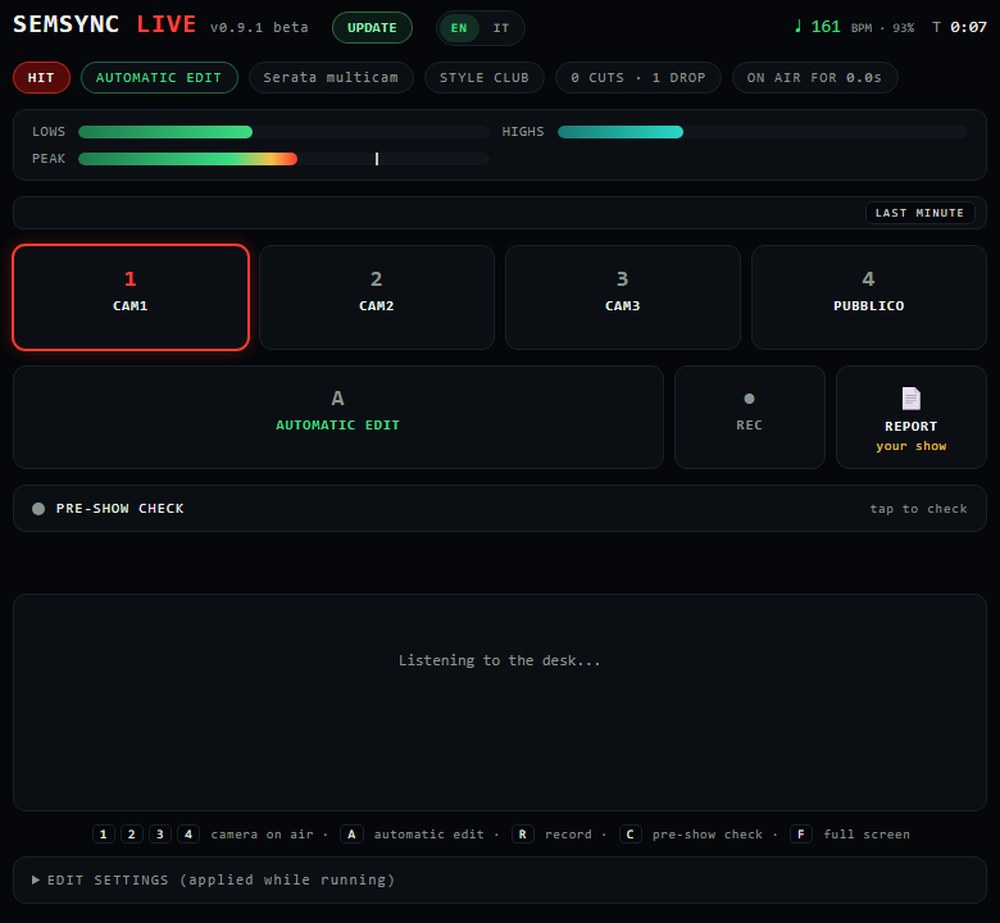
What SemSync does the morning after on the footage, Live does live: it hears the music and changes camera at the right moment, driving OBS and the ATEM.

SemSync Live · a simulated night, right nowopen it full size ↗
SemSync Live
The director's panel

The panel lives on a laptop wired to the mixer. From a computer this page lets you try it: a simulated night runs, and you press a camera to take over.

It feels the drop coming

The build is heard before the hit lands, and the camera is already the right one when it does.

It cuts on the beat

Changes fall in time, not whenever.

Your hand stays on it

You can take over at any moment, and Live learns from how you take over.

Tonight's stream is tomorrow's edit

What went on air comes back as a rough cut, with the mixer audio as the reference.

The check before you go on

Cameras, audio and connections checked one by one, with what is missing written down.

Your stream, on one page

At the end of the night a report to hand to the venue, with the logo of whoever shot it.

SEMSYNC LIVE · BETA by invitation. The system drives OBS and the ATEM from a laptop wired to the mixer. If you want to try it, write to us: we take a few at a time, because we follow every install ourselves.

Want LIVE in your venue?

We are setting it up in the first venues. Leave your email and we get back to you for a quote, and nothing else.

What it costs

One paid night, and it has paid for itself.

One licence, one computer. Change machine whenever you like: detach it from one and attach it to the other. The subscription exists because SemSync changes every week, and almost always because of somebody's real night: subscribers find the changes inside the next day, with one button. For festivals, venues and studios with more seats there is Enterprise, tailored.

Monthly
35€

per month

  • All of SemSync, updates included
  • One computer at a time
  • Cancel whenever you like
Get monthly
Yearly
20€

per month, paid once a year · 240 euro

  • The same twelve months, you save 43%
  • One computer at a time
  • Price locked for the whole year
Get yearly
Enterprise
tailored


  • Festival: the whole line-up, up to six computers
  • More seats on the same licence
  • One invoice and direct support
Write to us

SemSync CREATOR · Doing content rather than club nights? The Creator plan opens the Creator and Clipmaker doors: trimming, cameras on the voice, subtitles, reels, exports for TikTok, Instagram and YouTube. When you need multicam nights, you move up to Pro.

Creator, monthly
19€

every month, cancel whenever

  • The Creator and Clipmaker doors
  • One computer at a time, movable
  • Updates included
Get Creator
Creator, yearly
149€

a year · 12.40 a month

  • The same twelve months, 79 euro less
  • One computer at a time, movable
  • Updates included
Get Creator yearly

You have 14 days to change your mind, and we give the money back without asking why.

SemSync Festival · the long night for venues and festivals, Enterprise plan, on quote: the page

Questions

The things everyone asks.

Do I really need Resolve Studio?

No. With Resolve Studio, SemSync builds the project and the timelines inside Resolve, with nothing to import: it is the only version of Resolve that takes commands from outside. In Premiere Pro there is the SemSync panel: you open it from Window > Extensions and the timeline goes into the open project. With free Resolve or Final Cut Pro, SemSync writes the timeline file and you import it. Colour stays a Resolve Studio thing: the tables and the camera match are written onto its nodes, and they do not fit in a file. Said honestly: we check the file frame by frame at every release, but we have not yet opened it inside a real Final Cut or free Resolve, and the Premiere panel has only just landed. Until someone tells us how it went, we call those paths beta.

What does the Creator plan open?

The Creator and Clipmaker doors: the eye on your footage, the reel from the storyboard, the vertical with the subject followed, subtitles and chapters from the voice, and exports for TikTok, Instagram and YouTube. It does not open multicam nights: for those you need Pro.

Does my footage go anywhere?

No. Everything runs on your computer and your files are never touched: SemSync only reads them. The internet is only needed to link your account.

And if there was no mixer?

The job runs anyway. SemSync takes the camera that filmed the most as the reference and tells you so; if you prefer another one, you pick it. On a real night with no mixer, 20 clips out of 20 were locked. And if the reference camera only covers part of the night, it tells you while it works, not when you watch the video.

Does it give me a finished video?

Both. It gives you a real timeline inside Resolve, with the cuts already in place, and the edit stays yours: you work on it as you like. And if you need a ready video to hand over, that comes out too: the whole set in vertical 9:16 with your colour file, the clips on the drops, the aftermovie. Before telling you it is ready, SemSync checks that the file lasts as long as the edit, and warns you if the music is missing anywhere.

How long does it take?

It depends on the computer, on how many cameras and on how long the night is, so we only tell you what we have timed. On 22 September 2026, on a real night: a 77-minute set filmed by three cameras, almost three hours of footage in all. Synced and edited in 4 minutes 18 seconds, 1,197 cuts, on a laptop with an Intel Ultra 9 275HX. We did not take that time with a stopwatch: the program writes it itself at the end of the job, and on your computer it writes yours.

Can it handle a whole festival?

Yes, it is built for that. Write the line-up once, with each artist's time and genre, and SemSync prepares a folder for each one. You copy the cards when an artist steps off the decks; their set comes out on its own, synced, edited and also vertical 9:16 with your colour, one after another, even with the app closed. A board tells you who is ready, who is in the queue and how much drive you have left, told in hours of party. If a set breaks, it is marked to redo and the others carry on.

Does it work on Mac?

Yes. It is the same package and the same code, and on two real Macs it did everything: install, licence, syncing the night, the timeline in Resolve and exporting the videos. For now you install it from the ZIP; the double-click installer comes later.

What formats does it read?

MP4, MOV, MXF, WAV, MP3 and the common formats. It also works on files over a hundred gigabytes without copying them.
Try it on your next job

Fourteen days, on everything, no card.