Corporate, conferences, podcasts
The edit follows whoever is speaking, chapters and subtitles come from the voice, and the client gets a folder ready to use: the talks with names, one clip per speaker, the report. Inside DaVinci Resolve or Premiere Pro.
The sync
No timecode, no clapperboard, no files to rename. And what locks stays locked all night long.
0.1 ms of error on the known-truth bench, on a techno loop degraded down to -15 dB.
Every camera has its own clock and no two run the same. SemSync corrects all night and writes down how many seconds that camera would have drifted without it. Not parts per million: seconds and frames.
If the recorder was not there, you pick which camera acts as the reference and the job runs anyway: 20 clips out of 20 locked on a real night.
A file that is heavy but silent, or a dead mixer, is set aside first, and you are told why that clip does not lock.
Once the sync is done, SemSync looks at its own work the way an editor would: two clips of the same camera on top of each other, a clip out of shooting order, a cut of a few frames. What is certain it fixes, the rest it marks for you in Resolve.
Offset, drift, lock strength and state, one row per file. If a clip did not lock you read it there, before you open Resolve.
The voice
The voice is recognised on your own computer. No file leaves the building.
Written from the voice onto the already trimmed timeline, in Italian, English and other languages, even without Resolve.
YouTube chapters, title, description and hashtags taken from what you actually said, not from a template.
Pauses and filler words are taken out on their own, and the thumbnail is the sharpest frame in which you are talking to camera.
Colour
Puts the right LUT on each camera, checks it actually went on, and evens out the exposure from one camera to the next.
The LUT goes on that camera's first clip and is copied onto all of its clips. Then SemSync reads back from Resolve how many clips really have it, because Resolve answers 'done' even when it did nothing.
The list looks in three places: the ones that come with the program, your folder (you pick it once and it holds for every job) and the ones installed in Resolve.
Camera by camera: highlights, mids, how much you clipped and how far apart they are. Plus the list of moments to check, with the timecode.
The balance works clip by clip, not track by track: in the finished edit the cameras all sit on the same track, one after another.
The eye
Before editing, every shot is actually looked at, piece by piece.
It sorts clips by category (the detail, the chef, the room, the dj, the crowd, the aerial), measures whether they are sharp, exposed and steady, marks the heart of every clip and sets the rejects aside.
Not just how the shot is made: whether there is a gesture inside it. Where the category promises movement, a perfect still loses to a living shot.
In a club the strobe changes the exposure between one frame and the next, and it is why vision systems born on sports fields break in a nightclub. With the flashes, tracking goes from 14 points out of 300 to 300 out of 300.
With similarity and technique equal, between two shots it picks the more beautiful one, and the opening demands more of it.
The tools
Renames the footage, builds the proxies, cleans up the audio, writes the chapters and packs the folder to hand to the client.
Before you start: what you shot, at what frame rate, what does not add up.
The formats Resolve struggles with become files it opens without thinking.
It tells you where the space went (including the system data nobody can explain) and sends caches and temporary files to the bin. To the bin, never for good.
RAM, processor, the night's drive and the graphics card, before you start, with who is hogging what and what is worth closing.
A folder with several nights inside: SemSync works them one after another, even with nobody watching.
Inside Premiere Pro
You open it from Window > Extensions, and the edit lands in the project you have open.
Inside the panel there is the whole of SemSync, not a cut-down version: pick the folder, run the job, look at the results, without ever leaving Premiere.
The button says Send to Premiere, and SYNC MAP and ROUGH CUT appear in the open project, in a bin of their own, with the edit already open on the timeline. No file to go and find, no Import.
Open SemSync, go to ACCOUNT and press Put it inside Premiere. Then close Premiere and reopen it. On Windows, with Premiere Pro 2022 and up. It has just landed: if you open the panel, write and tell us how it went.
SemSync Live · beta by invitation
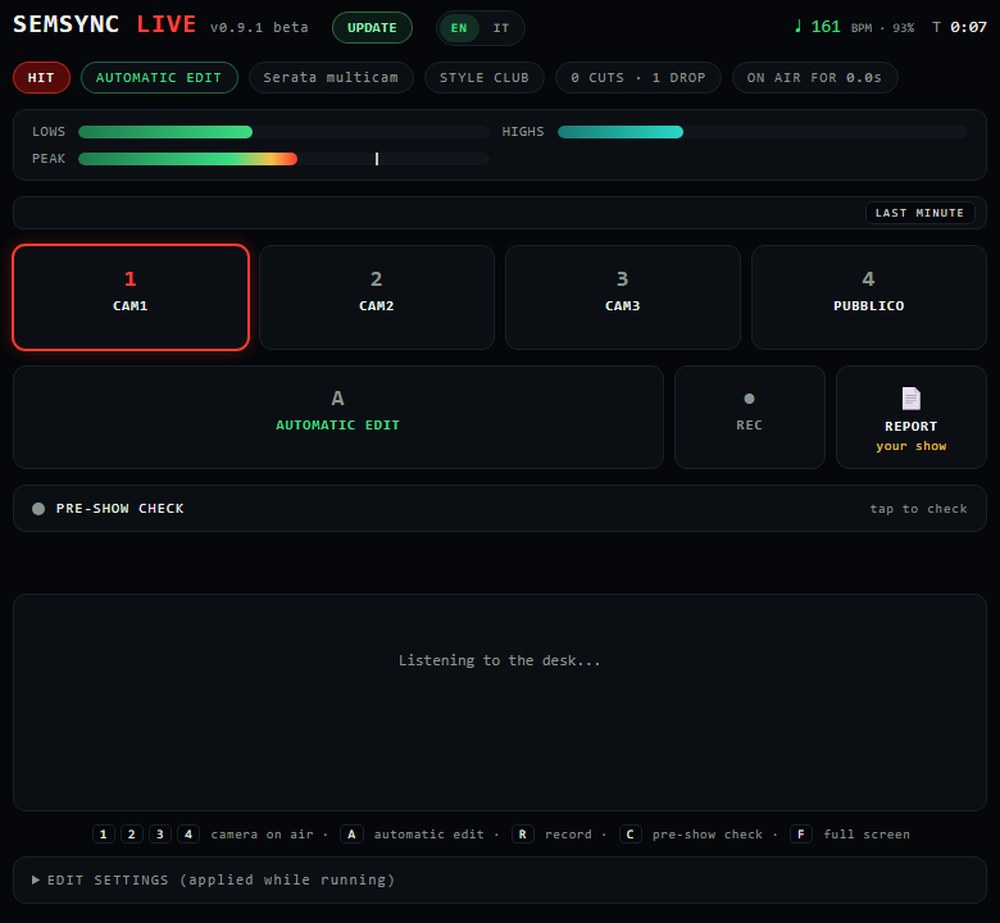
What SemSync does the morning after on the footage, Live does live: it hears the music and changes camera at the right moment, driving OBS and the ATEM.

The panel lives on a laptop wired to the mixer. From a computer this page lets you try it: a simulated night runs, and you press a camera to take over.
The build is heard before the hit lands, and the camera is already the right one when it does.
Changes fall in time, not whenever.
You can take over at any moment, and Live learns from how you take over.
What went on air comes back as a rough cut, with the mixer audio as the reference.
Cameras, audio and connections checked one by one, with what is missing written down.
At the end of the night a report to hand to the venue, with the logo of whoever shot it.
SEMSYNC LIVE · BETA by invitation. The system drives OBS and the ATEM from a laptop wired to the mixer. If you want to try it, write to us: we take a few at a time, because we follow every install ourselves.
We are setting it up in the first venues. Leave your email and we get back to you for a quote, and nothing else.
What it costs
One licence, one computer. Change machine whenever you like: detach it from one and attach it to the other. The subscription exists because SemSync changes every week, and almost always because of somebody's real night: subscribers find the changes inside the next day, with one button. For festivals, venues and studios with more seats there is Enterprise, tailored.
per month
per month, paid once a year · 240 euro
SemSync CREATOR · Doing content rather than club nights? The Creator plan opens the Creator and Clipmaker doors: trimming, cameras on the voice, subtitles, reels, exports for TikTok, Instagram and YouTube. When you need multicam nights, you move up to Pro.
every month, cancel whenever
a year · 12.40 a month
You have 14 days to change your mind, and we give the money back without asking why.
SemSync Festival · the long night for venues and festivals, Enterprise plan, on quote: the page
Questions
No. With Resolve Studio, SemSync builds the project and the timelines inside Resolve, with nothing to import: it is the only version of Resolve that takes commands from outside. In Premiere Pro there is the SemSync panel: you open it from Window > Extensions and the timeline goes into the open project. With free Resolve or Final Cut Pro, SemSync writes the timeline file and you import it. Colour stays a Resolve Studio thing: the tables and the camera match are written onto its nodes, and they do not fit in a file. Said honestly: we check the file frame by frame at every release, but we have not yet opened it inside a real Final Cut or free Resolve, and the Premiere panel has only just landed. Until someone tells us how it went, we call those paths beta.
The Creator and Clipmaker doors: the eye on your footage, the reel from the storyboard, the vertical with the subject followed, subtitles and chapters from the voice, and exports for TikTok, Instagram and YouTube. It does not open multicam nights: for those you need Pro.
No. Everything runs on your computer and your files are never touched: SemSync only reads them. The internet is only needed to link your account.
The job runs anyway. SemSync takes the camera that filmed the most as the reference and tells you so; if you prefer another one, you pick it. On a real night with no mixer, 20 clips out of 20 were locked. And if the reference camera only covers part of the night, it tells you while it works, not when you watch the video.
Both. It gives you a real timeline inside Resolve, with the cuts already in place, and the edit stays yours: you work on it as you like. And if you need a ready video to hand over, that comes out too: the whole set in vertical 9:16 with your colour file, the clips on the drops, the aftermovie. Before telling you it is ready, SemSync checks that the file lasts as long as the edit, and warns you if the music is missing anywhere.
It depends on the computer, on how many cameras and on how long the night is, so we only tell you what we have timed. On 22 September 2026, on a real night: a 77-minute set filmed by three cameras, almost three hours of footage in all. Synced and edited in 4 minutes 18 seconds, 1,197 cuts, on a laptop with an Intel Ultra 9 275HX. We did not take that time with a stopwatch: the program writes it itself at the end of the job, and on your computer it writes yours.
Yes, it is built for that. Write the line-up once, with each artist's time and genre, and SemSync prepares a folder for each one. You copy the cards when an artist steps off the decks; their set comes out on its own, synced, edited and also vertical 9:16 with your colour, one after another, even with the app closed. A board tells you who is ready, who is in the queue and how much drive you have left, told in hours of party. If a set breaks, it is marked to redo and the others carry on.
Yes. It is the same package and the same code, and on two real Macs it did everything: install, licence, syncing the night, the timeline in Resolve and exporting the videos. For now you install it from the ZIP; the double-click installer comes later.
MP4, MOV, MXF, WAV, MP3 and the common formats. It also works on files over a hundred gigabytes without copying them.